SpeedBox 3.2 for Yamaha
Compatible Motors
- Yamaha PW-SE
- Yamaha PW-X
- Yamaha PW-TE
- Yamaha PW-X2
- Yamaha PW-ST
Note: This kit is NOT compatible with SpeedBox App.
Installation Video
Click the link below to watch the full installation tutorial:
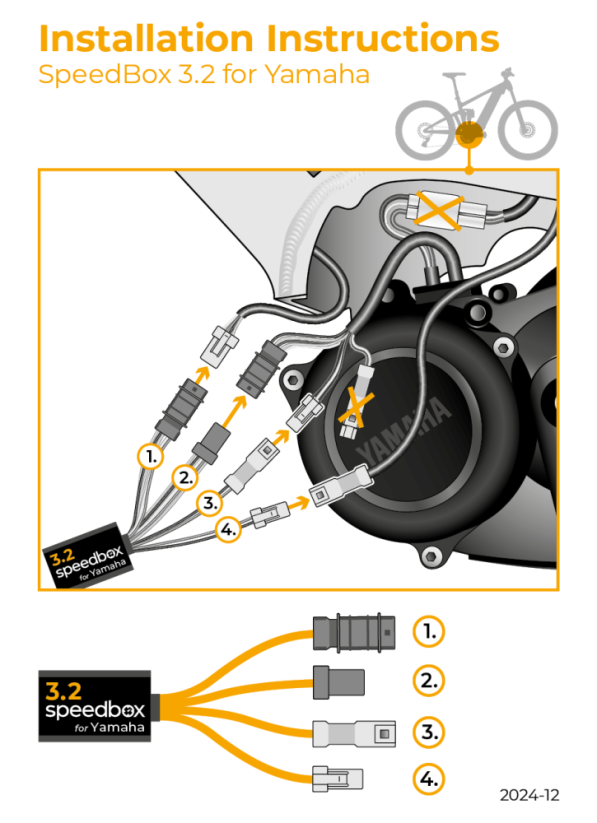
Wiring Diagram
How to Turn Tuning On/Off
You have two options to control the tuning:
Option 1: LIGHT Button
Press the LIGHT button to toggle tuning on/off.
Option 2: Arrow Buttons
Press ↑ ↓ ↑ ↓ (up, down, up, down) on your display. This method lets you control tuning independently of your lights.
When tuning is ON: Display shows 9.9 km/h (or 9 km/h on displays without decimals) – you can now ride at unlimited speed.
When tuning is OFF: Display shows 2.5 km/h (or 2 km/h on displays without decimals) – bike returns to standard 25 km/h limit.
Setting a Custom Speed Limit
You can set your own maximum assist speed:
- Switch through the modes 3 levels down, then 3 levels up
- The display will show your current speed limit
- Press the LIGHT button briefly (or rotate the rear wheel 360°) to increase the limit
- The limit saves automatically after 5 seconds
Important: New Bike Setup
If you're installing the SpeedBox on a brand-new bike, ride it for at least 10 km before activating the tuning.
Need Help?
If you have any issues with installation or activation, contact us with your bike details and we'll help you out.