SpeedBox 1.3 for Shimano EP8
Compatible Motors
- Shimano EP8 (EP800)
Note: This kit is NOT compatible with EP8 RS (EP801) motors.
Which Version Do You Need?
SpeedBox 1.3 (Standard)
- Basic tuning chip
- Controlled via LIGHT button
- Display shows speed up to 23 km/h only when tuning is active
- Best for: Budget-conscious riders who don't need real-time speed data
SpeedBox 1.3 B.Tuning (Bluetooth)
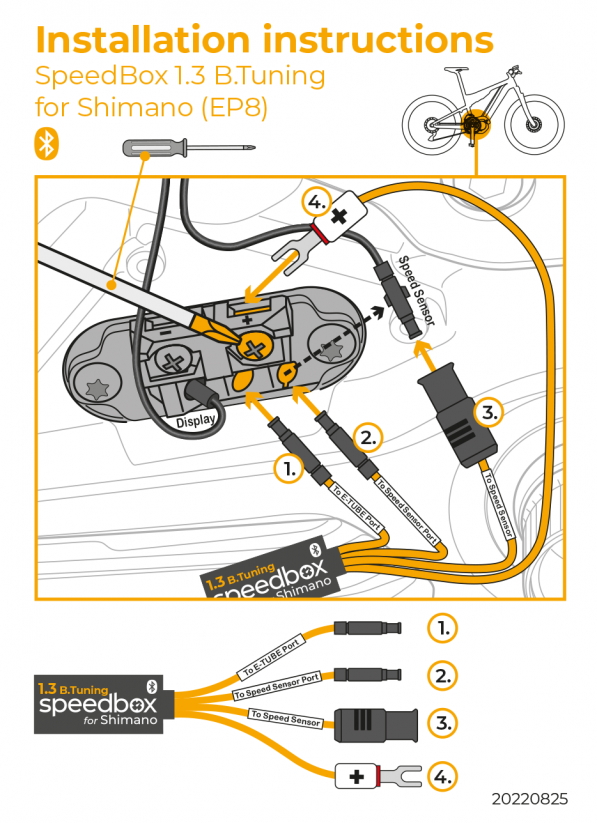
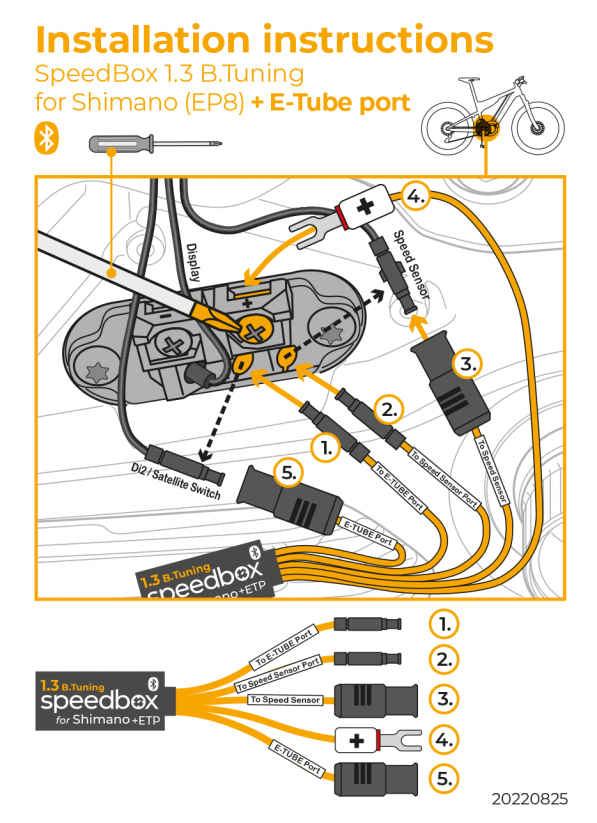
- Includes Bluetooth connectivity
- Works with the SpeedBox App on your phone
- See real speed, set custom limits, and track your rides
- Control tuning via app or double-click LIGHT button
- Best for: Riders who want accurate speed data and app control
Which Variant Do You Need?
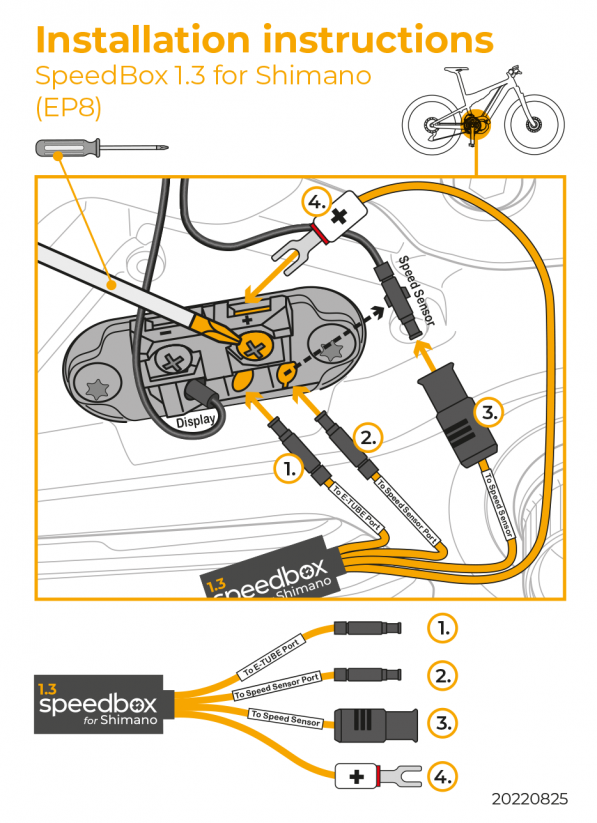
Standard version: Your motor has a free E-Tube port available.
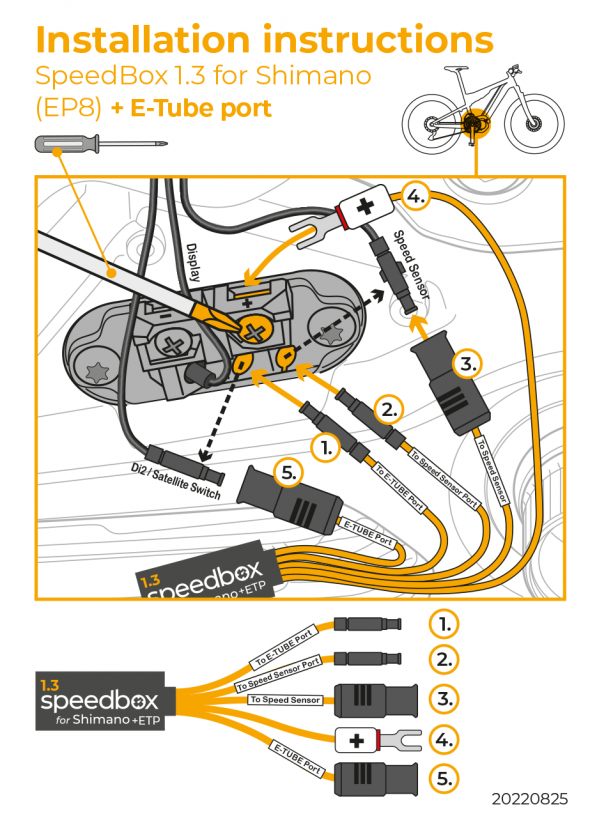
+E-Tube port version: Your motor does NOT have a free E-Tube port. This is usually the case if your bike has:
- Di2 electronic gear shifting
- Satellite System ON/OFF Switch (EW-SW100, EW-SW300)
Installation Video
Click the link below to watch the full installation tutorial:
Wiring Diagrams
Standard Version
+E-Tube Port Version
B.Tuning Standard Version
B.Tuning +E-Tube Port Version
How Tuning Activation Works
SpeedBox 1.3 (Standard)
The SpeedBox 1.3 is controlled using your LIGHT button:
- Lights OFF = Tuning is active (no speed limit)
- Lights ON = Tuning is disabled (25 km/h limit)
Want tuning always on? Connect the fork terminal from SpeedBox to the screw terminal marked "–" and tuning will be permanently active regardless of light status.
No lights function? If your bike doesn't have lights activated, the SpeedBox will be active at all times.
SpeedBox 1.3 B.Tuning (Bluetooth)
You can control tuning in two ways:
Option 1 – LIGHT button: Same as standard version (lights off = tuning on)
Option 2 – Double-click mode: Enable this in the SpeedBox App. Double-click the LIGHT button to toggle tuning on/off. The lights will flash to confirm. This keeps your lights independent from tuning control.
You can also set your custom speed limit directly in the app.
SpeedBox App Features (B.Tuning Only)
- Turn tuning on/off remotely
- Set custom speed limit
- See real speed, distance, and ride data
- Save and view your trip history
- Enable double-click tuning control
Download the app before your chip arrives to test the demo version:
Your phone needs Bluetooth 4.0 or higher.
Important: Speed Display (Standard Version Only)
When tuning is active on the standard SpeedBox 1.3, your display will show the actual speed up to 23 km/h only. Above this speed, the display will not show accurate readings.
If you want accurate speed data while riding, choose the B.Tuning version and use the SpeedBox App.
Important: New Bike Setup
If you're installing the SpeedBox on a brand-new bike, ride it for at least 10 km before activating the tuning.
Need Help?
If you have any issues with installation or activation, contact us with your bike details and we'll help you out.