SpeedBox 3.1 for Specialized (SL Motors)
Compatible Motors
- All Specialized e-bike motors (including SL)
- TCU / MasterMind TCU control units
Not compatible with:
- SpeedBox App
- Specialized GEN 4 (3.1 / S-Works motors) – use SpeedBox 3.2 instead
- IGH electronic shifting
Installation Video
Click the link below to watch the full installation tutorial:
Wiring Diagram
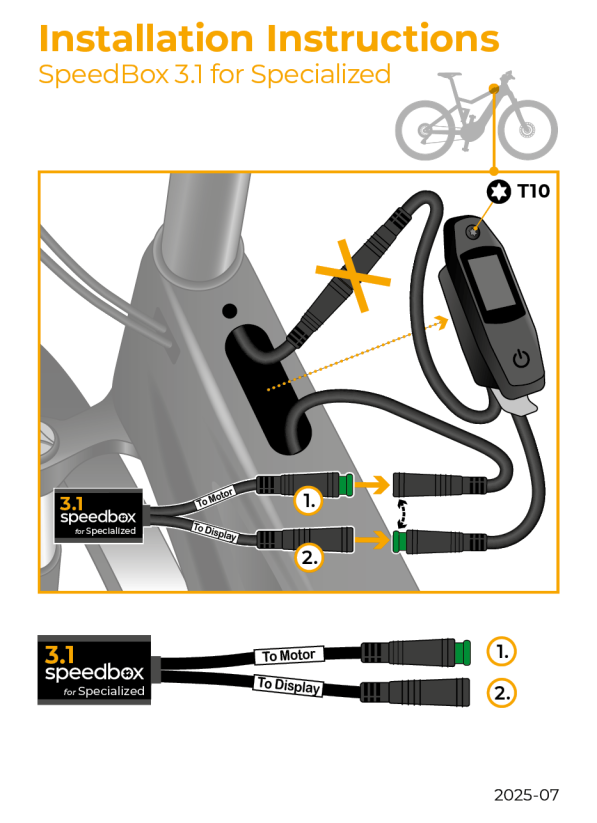
How to Activate Tuning
Initial activation: Turn the e-bike off and on twice. The tuning will now be active with a default max speed of 50 km/h.
Check current speed limit: Press the button combination + – + – to see your current max speed setting.
Setting a Custom Speed Limit
- Switch through the modes from TURBO: TURBO → TRAIL → ECO → OFF → ECO → TRAIL → TURBO
- The display will show the default limit (25 km/h)
- Briefly activate the WALK function to increase by 5 km/h (some displays may round the number)
- The limit saves automatically after 5 seconds
- Confirm by turning the e-bike off and on twice
Before Uninstalling
If you want to remove the SpeedBox, first set the assist speed back to 25 km/h using the mode switch sequence above, then confirm by switching the bike off and on twice.
Important Notes
- Speed indication in the Specialized Mission Control app may not display correctly
- If you have a TCU without a display or without a Walk function, consider the B.Tuning version with SpeedBox App instead
- If installing on a brand-new bike, ride at least 10 km before activating
Need Help?
If you have any issues with installation or activation, contact us with your bike details and we'll help you out.