SpeedBox 3.0 for Bosch (Non-Smart System)
Compatible Motors
- Bosch Active Line (Plus)
- Bosch Performance Line
- Bosch Performance Line CX
- Bosch Performance Line Speed
- Bosch Cargo Line
Note: This kit is NOT compatible with Bosch Smart System motors (which have round connectors).
Compatible Displays
Kiox, Intuvia, Nyon, Purion, Cobi (Retrofit Kit displays)
Installation Video
Click the link below to watch the full installation tutorial:
Wiring Diagram
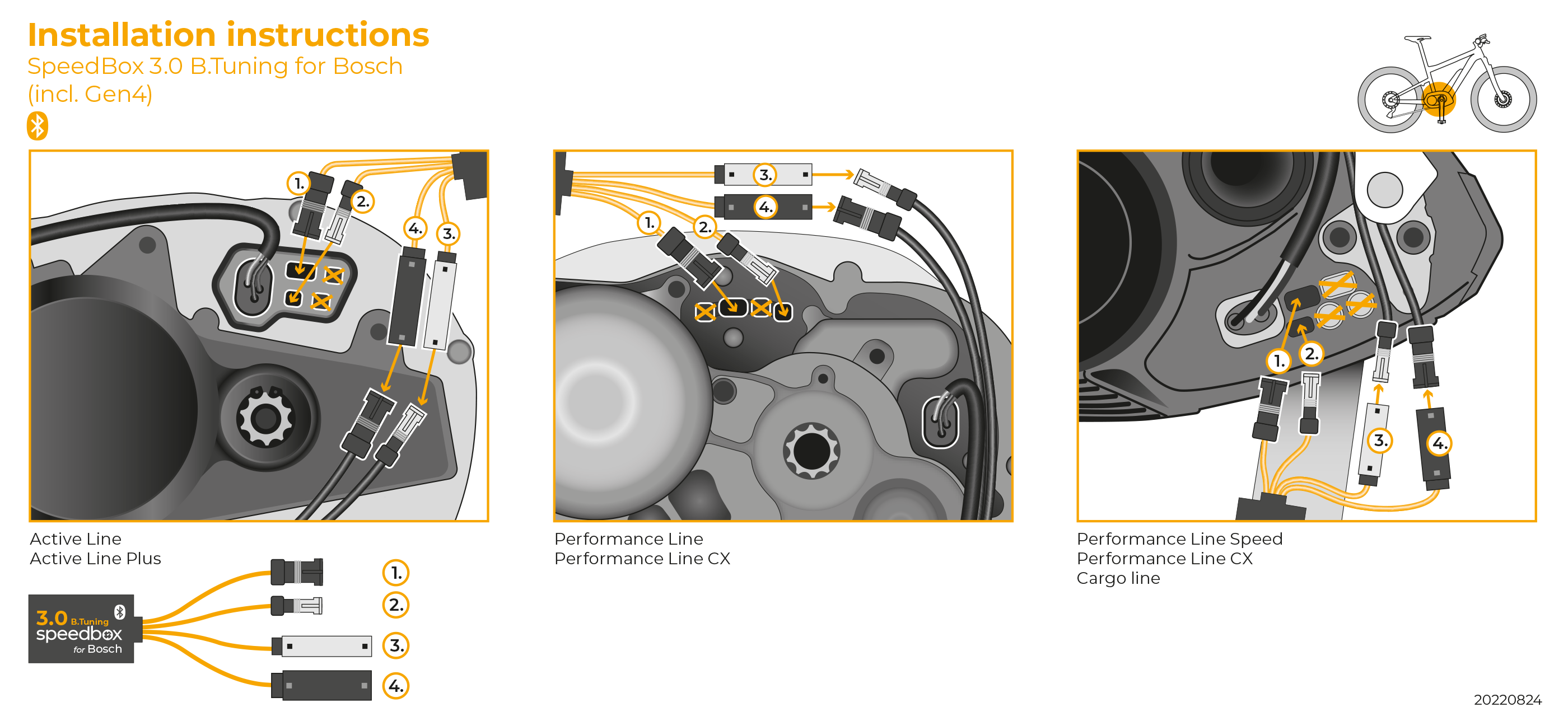
How to Turn Tuning On/Off
To enable tuning: Activate the WALK function on your display. The screen will briefly show 9.9 km/h – this confirms tuning is now active and there is no speed limit.
To disable tuning: Activate the WALK function again. The screen will show 2.5 km/h – the bike is now back to the standard 25 km/h limit.
No WALK button? Use the button combination + – + – on your controller instead.
Setting a Custom Speed Limit
You can set your own maximum speed limit (useful for saving battery):
- Switch to Turbo mode
- Cycle through the modes in this order: EMTB → Tour → Eco → Tour → EMTB → Turbo
- The display will show your current limit
- To increase by 5 km/h, briefly activate the WALK function (or rotate the rear wheel 360°)
- The limit saves automatically after 5 seconds
Reading the display: 3.0 km/h = 30 km/h limit, 4.5 km/h = 45 km/h limit, etc.
Important: Stopping & Countdown
After riding with tuning enabled, your display needs time to recalculate data when you stop.
- Short stop: Keep one foot on a pedal to pause the countdown
- Long stop: Let the countdown run – this may take several minutes after a long ride
- Do not disconnect the display until the countdown process is finished
Need Help?
If you have any issues with installation or activation, contact us with your bike details and we'll help you out.