How to use the date dials on your water pitcher filter
The Filter Life Indicator — the pair of dials on the pitcher lid — is a simple reminder system that helps you track when your filter cartridge is due for replacement. Setting it correctly after each cartridge change means you'll always know when your water is being filtered by a fresh cartridge.
What date should you set?
Set the dials to a date 3–4 months in the future. This reflects the expected lifespan of the cartridge under typical household use. If you use the pitcher heavily — filling it multiple times a day or for a larger household — set the reminder closer to 3 months. For lighter use, 4 months is appropriate. Remember: the cartridge should also be replaced if you reach 80 gallons of filtered water before the date you've set.
How to set the dials
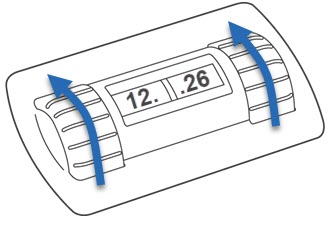
The Filter Life Indicator has two dials: one for the month and one for the day.
-
To set the month: roll the LEFT dial upwards until the correct month appears in the window.
-
To set the day: roll the RIGHT dial upwards until the correct day appears in the window.
NOTE: the day dial doesn't show every date — it increments in steps of 2 to 3 days. Select the nearest available date to your target.
The dials feel stiff or won't turn
The dials are designed to be slightly stiff — this is intentional, and prevents them from being accidentally moved during everyday use or when cleaning the lid. The dials also only rotate in one direction (upwards), so if you've gone past the date you want, continue rolling all the way around rather than trying to reverse.
If the dials are very difficult to move the first time — which can happen on new pitchers — apply a small drop of dish soap to the dial surface and work it in gently. This reduces friction and will make subsequent adjustments easier without affecting the mechanism.